 JayNest
Your Own AI Model (LM Studio, Ollama, Gemini Key), Step by Step
- iPhone and iPad
If you have an AI model on your own computer or an API key, JayNest can ask it for an item's name, category and properties. You enter the address of an OpenAI-compatible server, a key and a model. Your photos then go to your server, never to JayNest.
On iPhone
- In the Settings tab, tap Recognition, then under Recognizes the Item tap Your Own AI Model. The server settings screen opens.
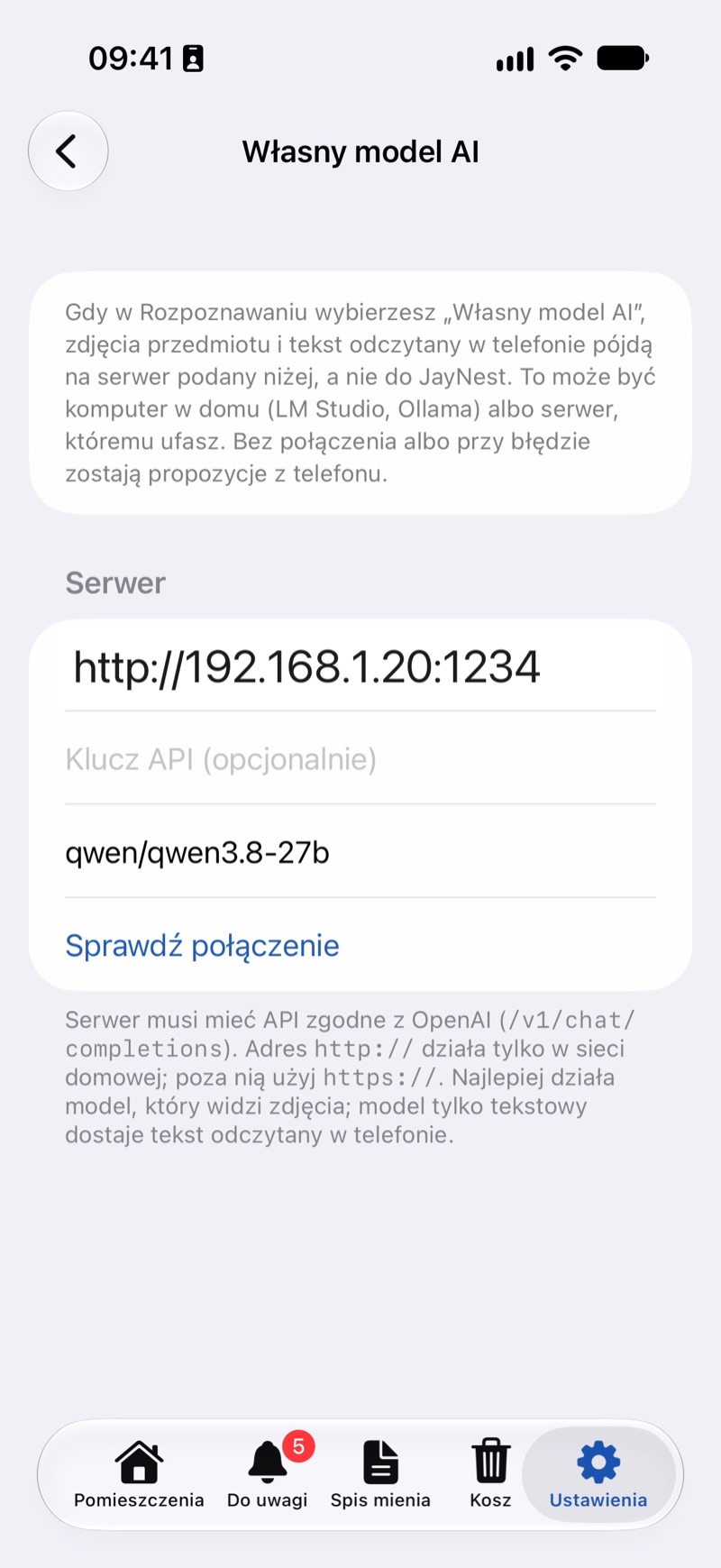
- In the address field, enter the server address:
- a computer at home: its address on your home network with the port, such as
http://192.168.1.20:1234for LM Studio orhttp://192.168.1.20:11434for Ollama; - Gemini:
https://generativelanguage.googleapis.com/v1beta/openai.
- a computer at home: its address on your home network with the port, such as
- If the server needs a key, enter it in API Key (Optional). For Gemini, it's a key from Google AI Studio.
- Tap Test Connection. For a computer at home, your iPhone asks for access to the local network: allow it. Once connected, you see how many models the server has, and the Model field turns into a list. Choose a model.
- Go back to the Recognition screen: Your Own AI Model has a checkmark, and its row shows the server address.
- Give it a try: take a photo in a new item. The note under the photos will say that the suggestions come from your model.
Server on Your Computer
- LM Studio: download a model that can see images. In the Developer tab, turn on the server with local network access (“Serve on Local Network”). The server address is shown next to “Reachable at”.
- Ollama: download a model that can see images and start a server that's reachable on the network, for example with
OLLAMA_HOST=0.0.0.0 ollama serve. The address ishttp://<computer address>:11434. - Your phone and computer must be on the same network. Away from home, you need an
https://address, for example through your own server or a tunnel.
Good to Know
- The item's photos go to your server, and on iPhone also the text read on the phone. None of it reaches JayNest.
- A plain
http://address works only on your home network. Outside it, the address must start withhttps://. - A model that can see images works best. On iPhone, a text-only model gets only the text read on the phone.
- A Google AI Pro or ChatGPT Plus subscription doesn't include an API key. Any charges for using a key are between you and its provider.
- Whatever the model leaves out, recognition on the phone fills in. If the server doesn't answer, the suggestions come from simple rules, and the note under the photos says why.
- Other ways of recognizing items are described in How recognition works.