 JayNest
Home Inventory for Your Insurer: A PDF After a Theft, Fire or Flood
- iPhone and iPad
- Browser
Home Inventory turns your catalog into an A4 PDF. The title page shows the owner, date, scope, number of things and total value. After that, room by room, comes every item with a photo thumbnail, category, brand, model, serial number, purchase date, price, warranty, location and label code.
On iPhone
- Open the Home Inventory tab. To make an inventory of one room or container, open it, tap ⋯ (More) and choose Home Inventory….
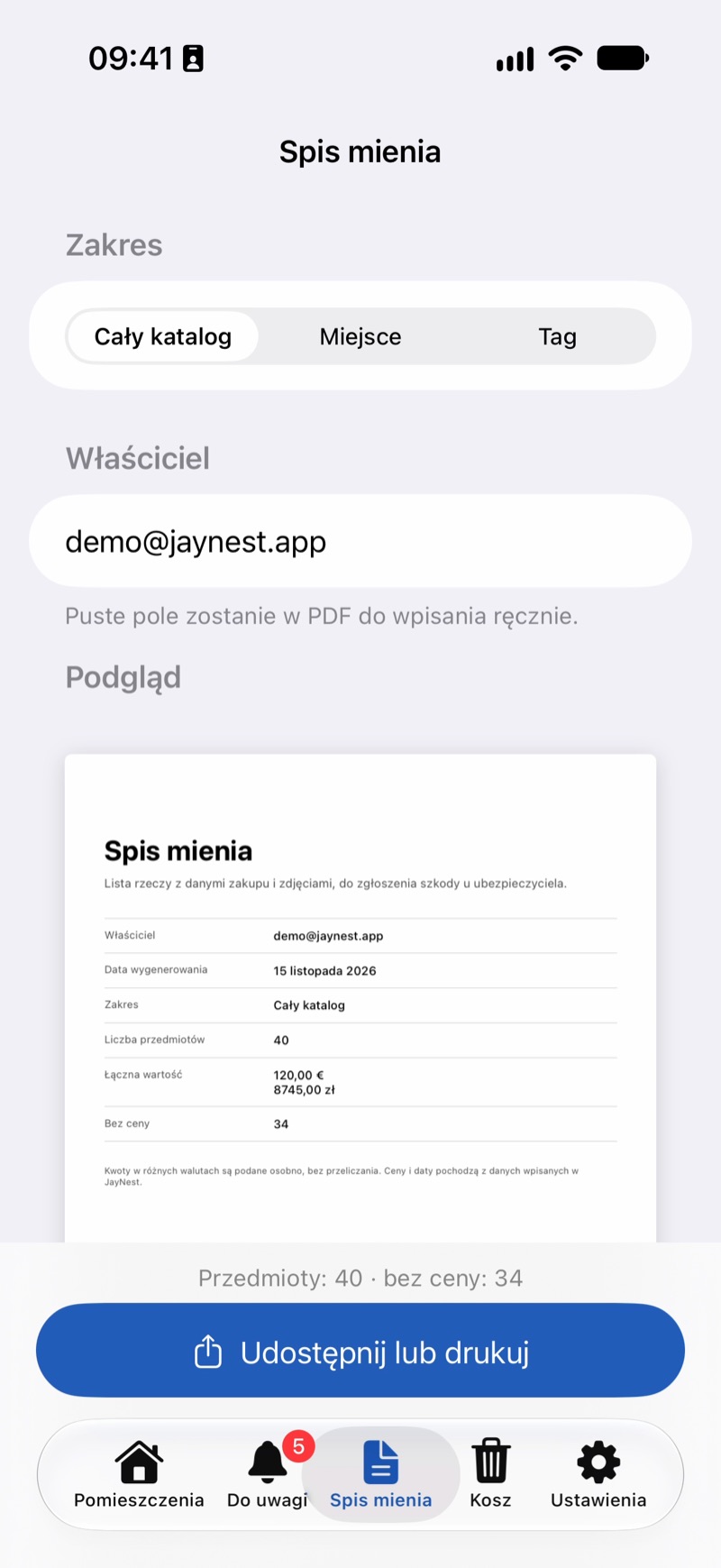
- Under Scope, choose Entire Catalog, Location (a room or container with everything inside) or Tag (things with one tag).
- Check the Owner field. With a JayNest account, it holds your account's email address. You can type your name instead, or leave the field empty and fill it in by hand on the printout. The owner appears on the title page and in the footer of every page.
- Below, you can see a preview of the first pages and how many things have no price.
- Tap Share or Print and email the file, save it in Files or print it.
In the Browser
- Click Home inventory in the menu on the left. For one room or container: open it, click ⋯ (More actions) next to its name and choose Home inventory.
- Choose the Scope and check the Owner field.
- Click Print or save as PDF. In the browser's print dialog, choose "Save as PDF" or a printer.
Chrome and Edge add the page numbers and the JayNest footer. In Safari and Firefox, turn on headers and footers in the print dialog.
Good to Know
- At the end of the inventory there is the value by room and a separate list of things without a price, so you can see what still needs filling in or a receipt attached.
- The inventory is a list of the data you entered. Prices are as entered, not multiplied by quantity, and JayNest doesn't convert amounts in different currencies; it lists them separately. The inventory doesn't replace receipts or a valuation.
- Things you borrowed from someone aren't included, because they aren't yours. Things in the Trash aren't included either.
- The inventory is in the app's language and stays readable when printed in black and white.
- The more you enter for your things, the more complete it is: price, purchase date and warranty, fastest from a photo of the receipt.